Search for answers or browse our knowledge base.
Certified Learners
Overview
Being a Certified Learner means having a document that proves that you have successfully finished a course of training. This can be downloaded as a CSV Document that can be shared with others as Proof of Completion.
How to get a Certified Learners Report?
Click the Report option under the Admin(Dept) section.
Select the Certified Learners option.
Use the dropdown menu to find the choice of Session Type you want.
Then, use the next dropdown menu to find the choice of Course you want.
Select the from date and to date within which you want your report.
Select Get Report to generate a report successfully.
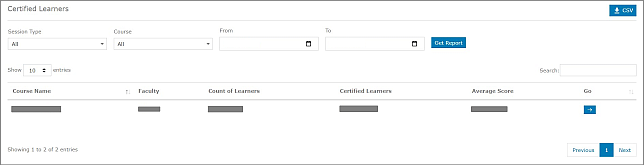
On the left side, the learner can choose how many Entries they want to see on a page.
In case the learner has too many Entries, the learner may use the Search option on the right side.
In the row of the desired Course, click the arrow icon under Go to generate a Report.
NOTE: On the top right side, the learner can download the Certified Learners Report in CSV format by clicking the CSV button.